Generator
Resolves module pins, merges catalogues and runtime files, enforces source policy, and builds the deployable release.
build.sh → checked source → dist/
Alpha · reproducible self-hosted infrastructure
Choose the services. Build the release. Verify the host.
Put the services you want in one site manifest and pin every module to an exact revision. Platform Zero checks the source, builds a secret-free release, renders its Podman and systemd runtime on the target host, and verifies the deployed contract.
Open source · exact module pins · secret-free build · isolated runtimes · verified activation · release rollback
Alpha software: the architecture works on the project’s test stack, but interfaces and module contracts are still changing. Expect hands-on setup, debugging, and upgrades.
01 / your inputs
02 / release and proof
dist/ release
host decrypt + render + reconcile
proof verify services + identity + recovery
● local build changes no host / secrets render only on target / verification required
What Platform Zero actually does
It is a build and deployment system, not a fixed bundle of apps.
The operator path starts with build.sh. It resolves the site’s pinned modules, merges their catalogues and runtime contracts, runs source checks, and writes a secret-free release under dist/ without changing the target host.
On the target host, deploy.sh decrypts the site inputs, renders runtime configuration, validates the Podman bundle, installs generated systemd user units, and reconciles the requested target. verify.sh then checks the deployed contract.
dist/
Where each decision belongs
When something changes, there is a clear place to change it: generic assembly lives in the generator, service behavior lives in a module, and the choices for one deployment live in its site configuration.
Resolves module pins, merges catalogues and runtime files, enforces source policy, and builds the deployable release.
build.sh → checked source → dist/
Package one service or a related group: its runtime contract, configuration, container context, dependencies, and module-owned tests.
stack.runtime.yaml + config + tests
Selects modules, pins exact revisions, carries encrypted deployment inputs, and identifies the target environment.
selection + pins + encrypted values
List the modules in the site manifest, record exact revisions, and keep deployment inputs encrypted.
Resolve the pins, merge module contributions, enforce source checks, and write the secret-free release locally.
./build.sh --manifest /path/to/site/manifest.json
Sync dist/ to the host; decrypt, render, validate, install, and reconcile the requested runtime there.
cd ~/webservices && ./deploy.sh
Check readiness and the deployed runtime contract, then run focused or complete service and browser suites as needed.
./verify.sh
Why Podman fits this model
The current alpha runs ordinary apps and container-creating tools in separate rootless operating-system accounts. Podman is a good match for that layout: containers do not require one central privileged daemon, while an API socket can be added inside only the user domain that needs it.
In a common Docker setup, access to the main socket can mean broad control over the daemon and what it can reach. If CI, notebooks, tests, and long-lived apps share that control plane, the potential blast radius grows.
In the generated layout, each socket controls its owning user’s rootless runtime. UNIX permissions, separate subordinate-ID ranges, storage, and user systemd managers are used to keep those control planes apart.
A notebook or CI job can create containers without receiving the application socket or rootful control plane. This limits exposure to that service account’s host permissions and rootless runtime.
Quadlet turns generated container definitions into systemd units. Services start, stop, log, fail, and restart through the host’s existing supervisor rather than depending on one always-on container daemon.
Tools such as JupyterHub and Forgejo Runner can use a Docker-compatible Podman API. Where needed, Platform Zero enables a separate, socket-activated API service for the owning user instead of sharing one socket across the stack.
The precise comparison: this is not a claim that Podman uniquely makes isolation possible. Docker can also be configured with rootless or multiple daemons. Podman’s daemonless architecture simply fits Platform Zero’s generated per-user model well. These boundaries reduce blast radius; they do not replace careful permissions, updates, or review of the remaining rootful services.
Security follows the deployment
Platform Zero does not put every container behind one privileged socket. Placement, identity, validation, secret delivery, and rollback are explicit parts of the generated bundle, so the important boundaries can be reviewed before activation.
Modules declare whether they need host access. Ordinary applications run in the generated rootless domain; rootful placement remains a visible exception for infrastructure that actually needs it.
rootful only when host access is required
JupyterHub, Forgejo Runner, managed test runners, and Workload Spawner each have a separate user, runtime directory, release root, and Podman socket.
webservices ≠ jupyterhub ≠ test-runners ≠ forgejo-runner ≠ workload-spawner
OIDC-capable services connect to Keycloak. Proxy-auth services accept identity headers only from configured proxy ranges, and enabled clients must have the credentials they require.
Keycloak clients + explicit trusted proxy CIDRs
Encrypted site inputs can remain bundled. The installer can render them before activation or accept a separate directory of final per-service environment files, then installs restricted copies into each owning domain.
encrypted inputs or separate env files → restricted runtime files
Without --activate, the installer checks the bundle manifest, environment files, Quadlets, and generated units, then exits before installation.
validate first → activate deliberately
Versioned releases switch through current links, and failed activation restores the previous release. Eligible registry-managed daemons update with Podman rollback and freeze further updates after a failed run.
versioned activation + guarded auto-update
The result is inspectable: stack.ir.json shows placement and dependencies; the generated directories show exactly which Quadlets, users, sockets, and releases will be installed.
A release must earn activation
Source policy, artifact provenance, deployment durability, and identity behavior are checked at the boundaries where a plausible-looking release can still fail.
Security policy, secret scanning, and vulnerability checks run before a release is trusted.
Inspect the gates → 02 / artifactThe host update path requires release evidence instead of rebuilding an unreviewed tree in place.
Inspect the release path → 03 / durabilityRuntime environments persist, in-place updates are guarded, and the prior release remains the recovery path.
Inspect deployment safety → 04 / identityNative OIDC, edge authentication, nested destinations, and mobile callbacks receive explicit coverage.
Inspect authentication proof →Capabilities you can compose
Start with the capabilities people need: shared files, chat, monitoring, notebooks, code, search, or automation. The site manifest includes the modules you select and the dependencies they require. If a needed service is missing, package its repository with the same module contract instead of burying another custom install in the host.
Files and editing with Seafile and OnlyOffice; Matrix chat and calls; planning in Planka; mail and calendars in SOGo.
Prometheus metrics, Grafana dashboards, Alertmanager routing, Loki logs, Kopia backups, and ntfy notifications.
Git hosting and CI with Forgejo, Jupyter notebooks and shared hubs, disposable workspaces, and full-stack test runners.
Private metasearch with SearXNG, operator-managed per-user n8n through Workload Spawner, specialist APIs, and site-only modules.
Examples from a running test deployment
Monitoring, automation, alerts, team response, publishing, and search are separate products here, but they share one operator-controlled stack. These screenshots show the current alpha in useful, populated states rather than login pages or empty dashboards.
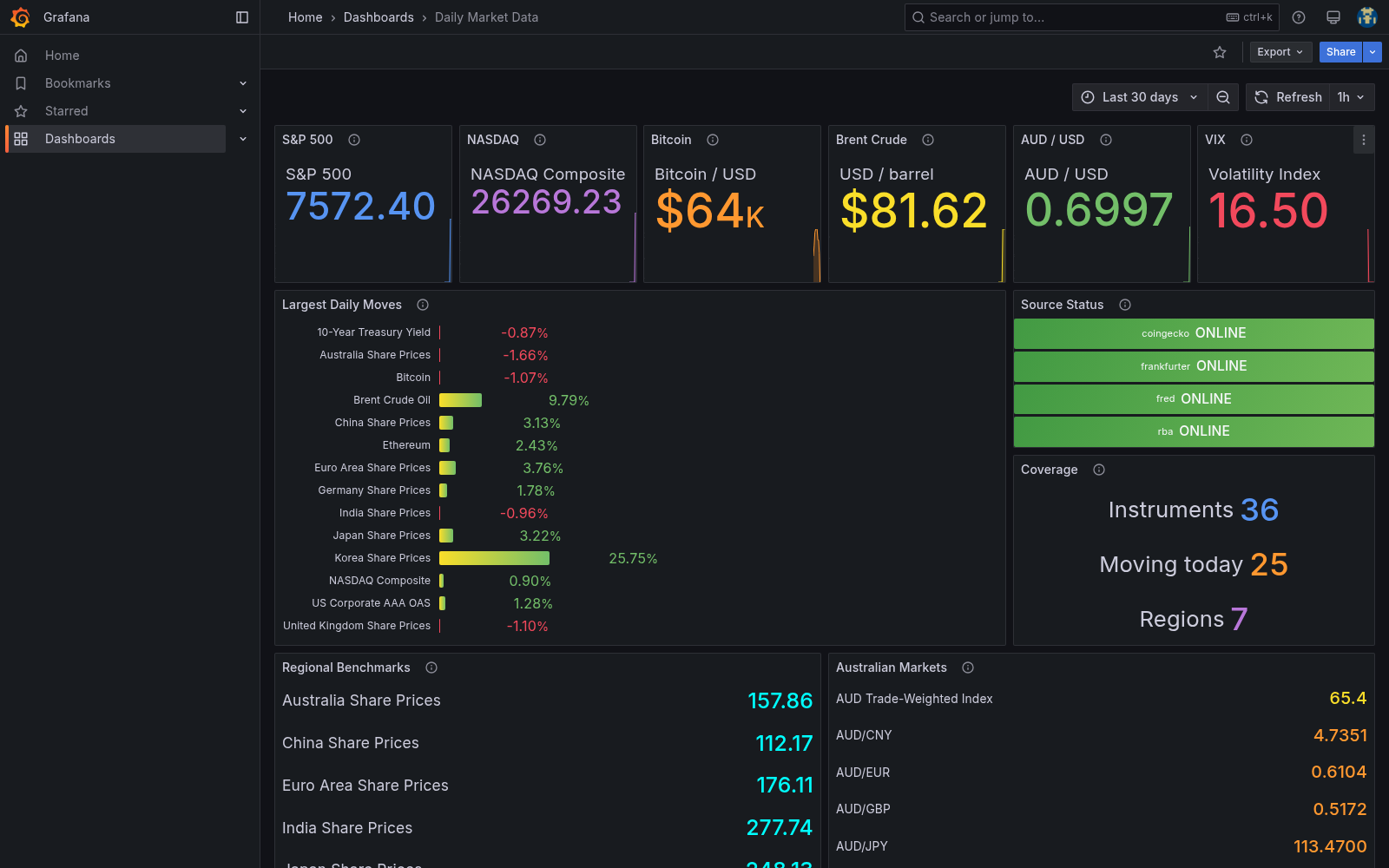
One dashboard combines 36 instruments from four sources, highlights the day’s largest moves, and makes stale or failed feeds obvious.
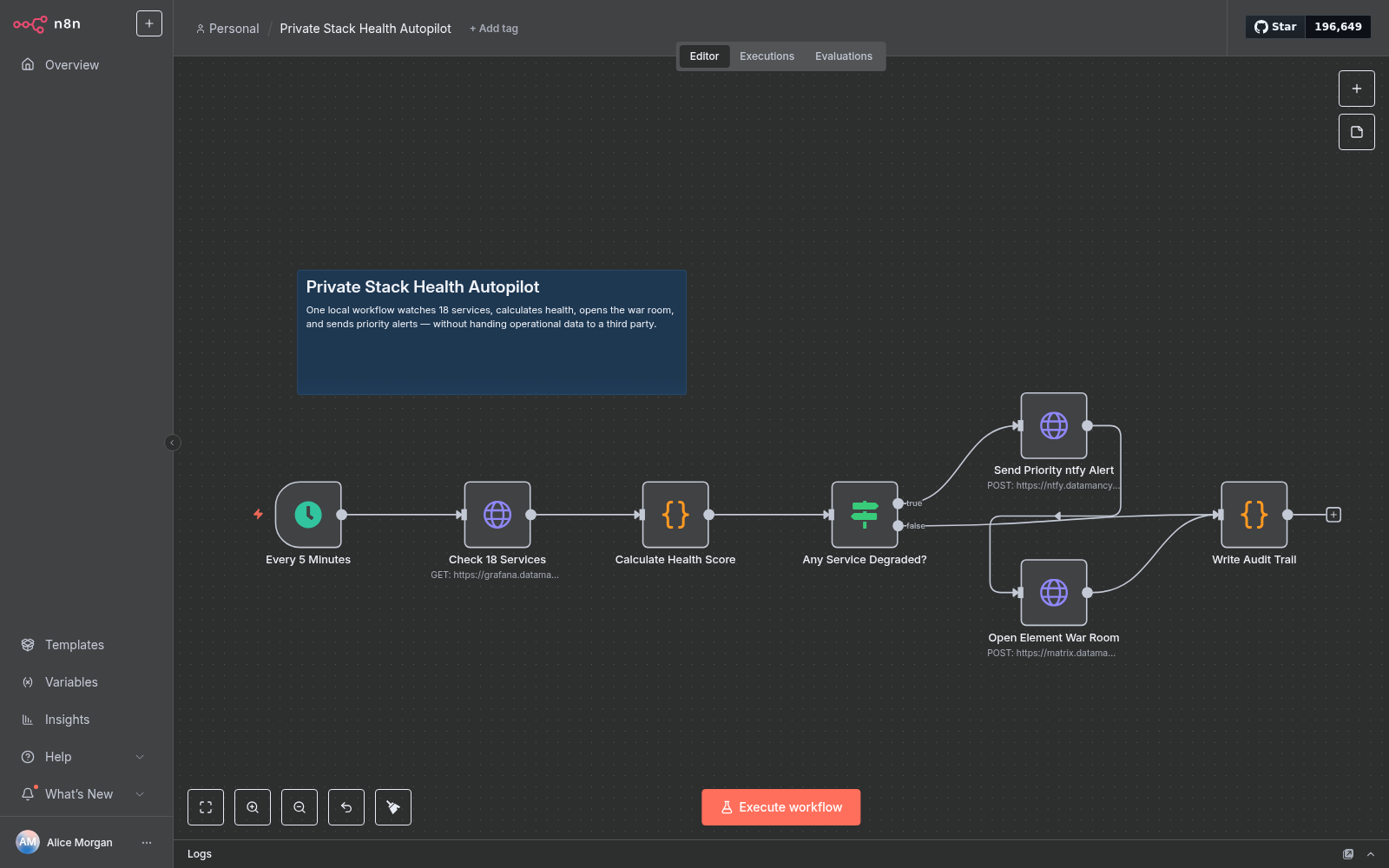
Workload Spawner’s first template creates a persistent n8n service for one user. Here it checks 18 services, sends an ntfy alert, opens the Element room, and writes an audit record.
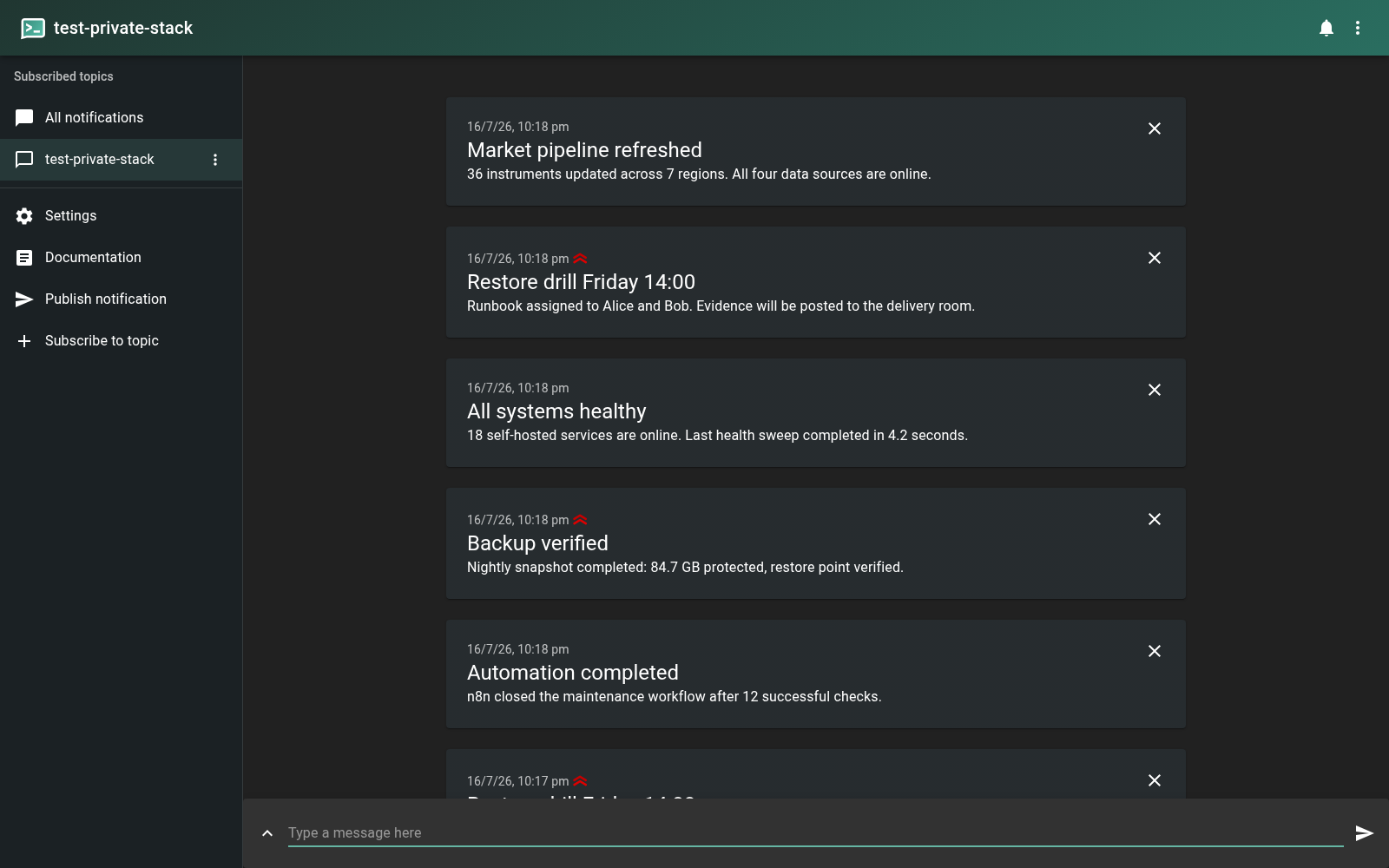
The private topic carries specific events: 18 services healthy, 84.7 GB backed up, market data refreshed, and Friday’s restore drill assigned.
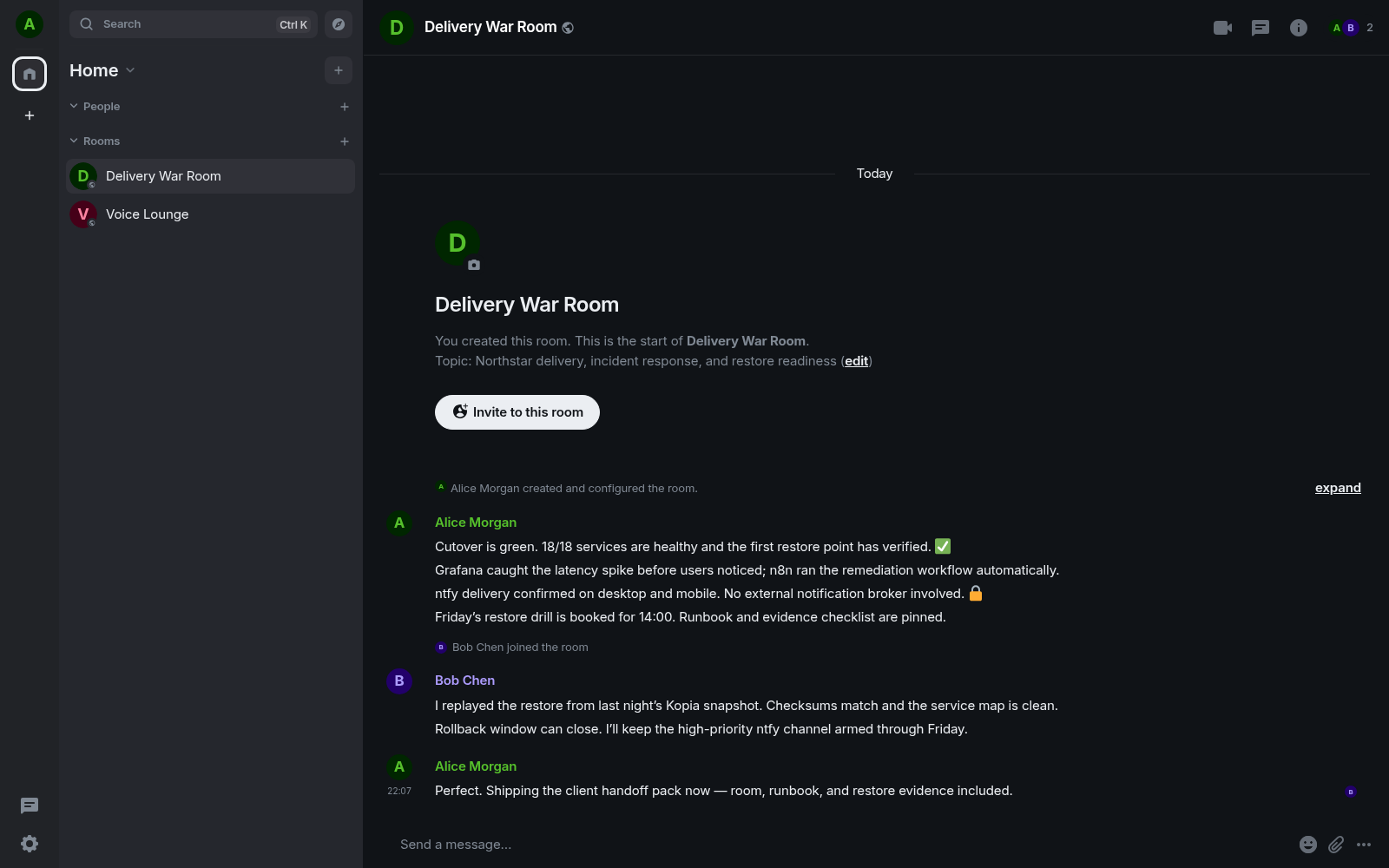
Alice and Bob close a cutover in one Matrix thread, with the health result, restored snapshot, rollback decision, and next drill all visible.
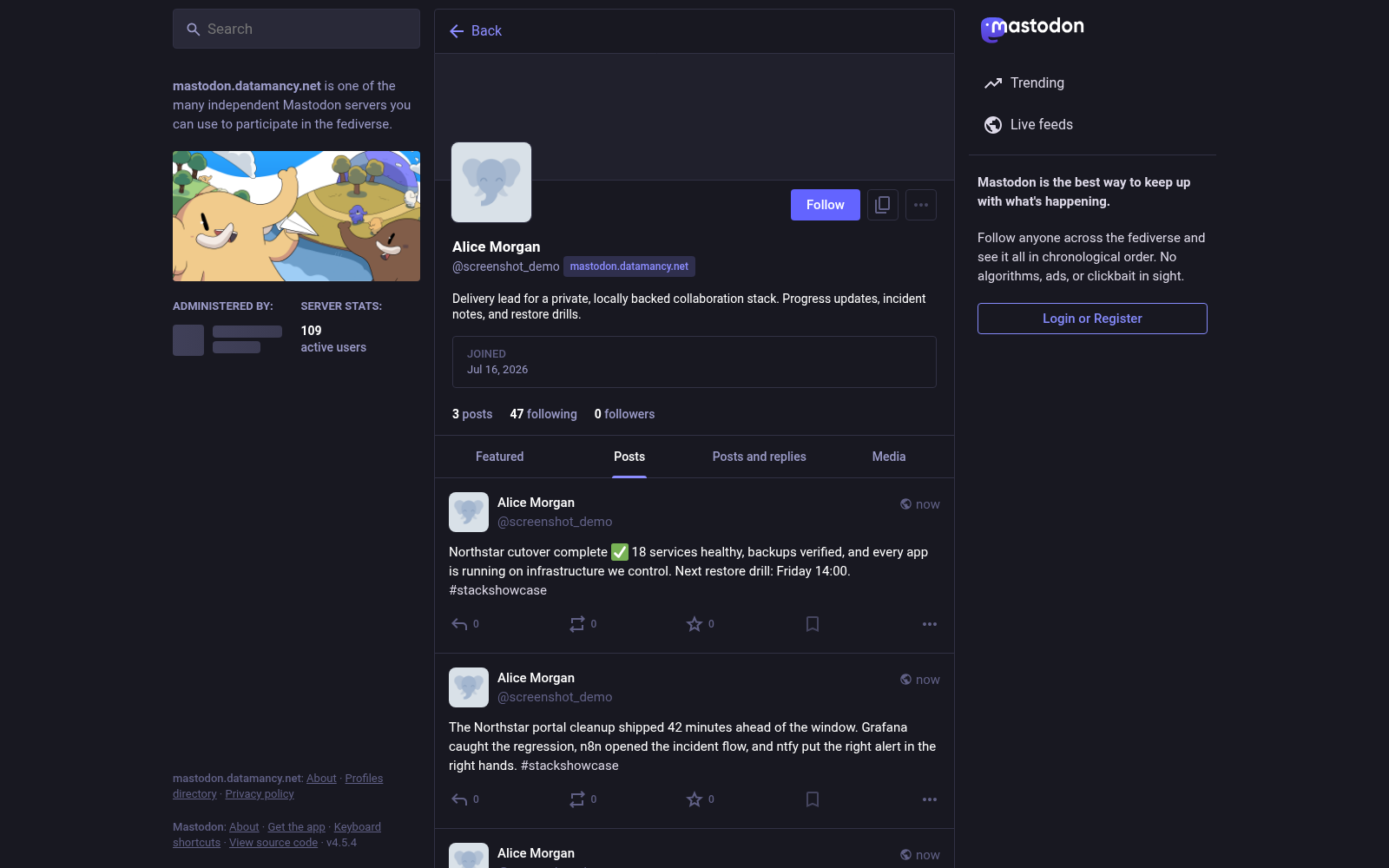
The same stack can publish its own updates: cutover complete, 18 services healthy, backup checked, and the next restore drill scheduled.
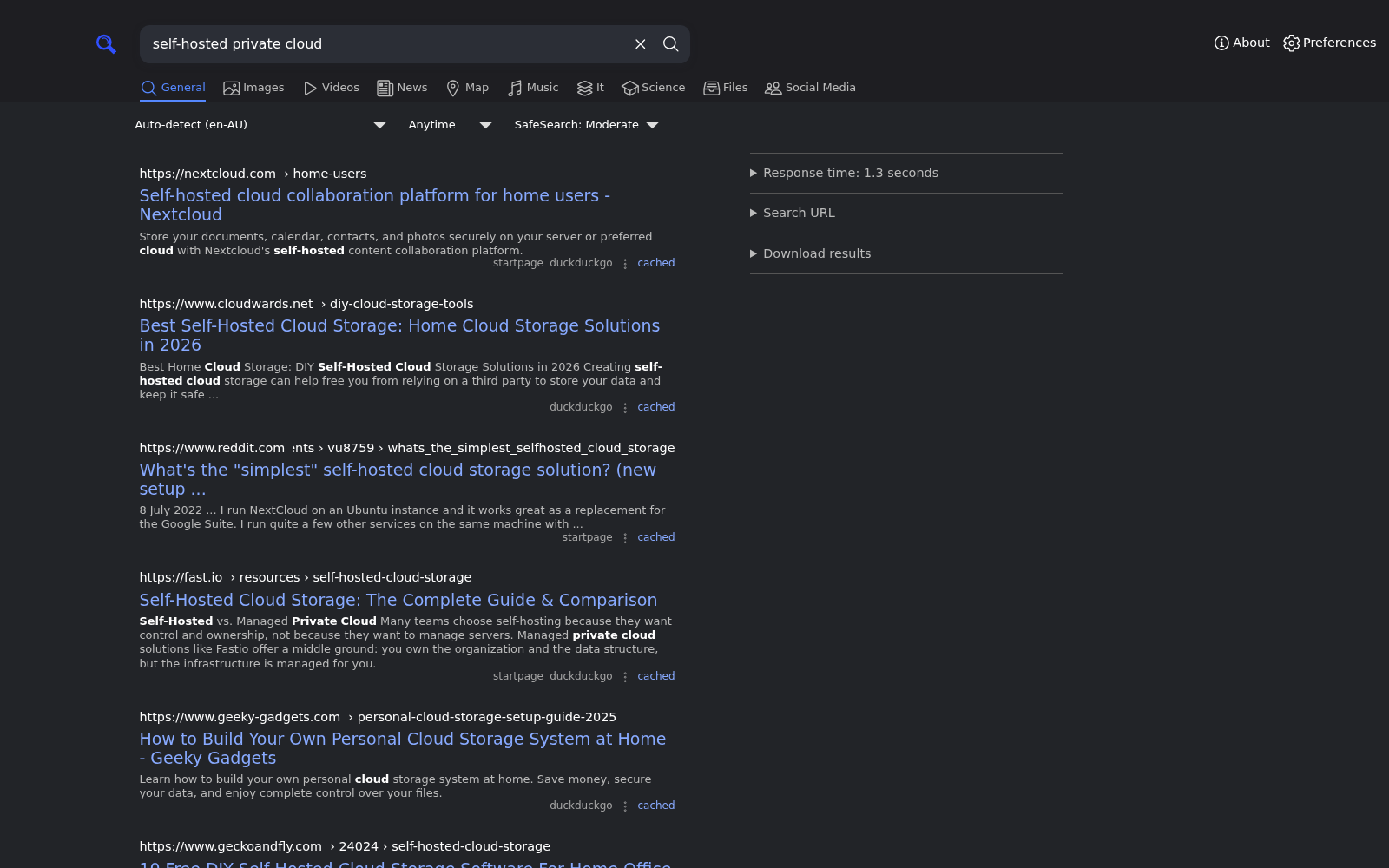
The active rootless SearXNG module serves browser and JSON search behind the shared Caddy and Keycloak edge. This query gathers results from multiple external engines.
A good fit—and when it is not
It earns its maintenance cost when you need control, reproducibility, and workflows that cross product boundaries. If one hosted product already covers the job, use the simpler product.
Sketch the first stack
Write down who will use the system, what they need to do from start to finish, which services or data must remain, and the constraints that matter. That is enough to choose a first set of modules and see where custom work is actually needed.
A useful first pass can be six lines. It does not need to name every container.